
We sincerely Thank You for being our customer! |
||
How To Install the Latest Version
|
||
| If your Registration Code will install the latest version (see above), order this to ship the latest versions of ALL MTU Software on CDROM (you can also instantly download via the Internet). | $40.00  |
|
| 5 Ways to Get Help | ||
 at the left downloads that Microstudio version installation file.
Vogone Easy | |||||
| See Version Changes | Download File | Release Date | Install Date | Windows Versions | User Move |
| 3.51 |
|
Sept 27, 2013 | Mar 01, 2013 | 10.1, 10, 8.1, 8, 7 (32/64bit) | YES |
 V3.51.04 Released September 27, 2013
- Fixed - Installation Program - Customers using 64-bit Windows PCs reported errors when installing. We have fixed this issue which would cause you to see an error message such as <winsys>xxxx.xxx.
V3.41 Released February 28, 2011
- FIXED - Open File Buffer Now Clearing - In Version 3.40 when you opened an MP3 or WMA compressed song, then opened a second MP3 or WMA song to process, the second would APPEND to the end of an internal buffer that still contained the first song. This would play the first song and then the second song. This is fixed.
V3.40 Released August 30, 2010
- NEW - Runs on Windows 7 - This version runs on both 32-bit and 64-bit Windows 7, Vista and XP.
- NEW - Automatic Check for Updates - When Vogone Easy first runs and the computer is on-line, it automatically checks to see if 7 days have passed since the last access to the MTU web site. If under 7 days, it won't check now. If more than 7 days, it checks for a new release. This does not delay the program running. The message box that appears has a "Hide this message for version NNN" checkbox where NNN is the new version number. If clicked, the message for the version being reported does not appear again. When a new version is released later than this one, the message appears with text explaining this new version's features. Three messages can appear.
- CHANGED - Help Menu Check for Updates - Clicking this with the computer on-line immediately checks to see if a new version is released. A progress meter shows the steps advancing to the final message.
V3.30 Released October 10, 2008
Vogone Easy 3.40 performs near perfection. The only changes we have made are to give you a new flexibility.
- NEW - Runs on Windows Vista - This version runs on both 32-bit and 64-bit Windows Vista and XP.
- NEW - Users Can Remove and Re-Install On Another Computer - Vogone Easy allows installing on one computer. If you want to remove it and install on another computer, you can now do this yourself without help from MTU.
- NEW - View Registration Code Dialog - This now shows the computer Name you enter for the first MTU software product installed on this computer. This allows MTU to know which computer you may need help with.
V3.201 Released February 14,2008
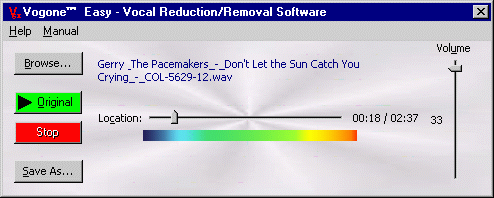
- Easy To Use - Vogone Easy is based on the Vogone technology, but is less expensive, has fewer features, and just doesn't get any easier to use.
- Removes Center-Panned Vocals - Removes vocals from the same songs any other product can, which is most songs you can buy. It won't remove off-center vocals, but its big brother Vogone™ can.
- Stand Alone Program - It doesn't require other programs.
- High Quality Results - It delivers quality equal or superior to other vocal removers.
- Play Anywhere - You can click and drag the Location slider to play anywhere in the song.
- Play Original & Play Vocal Removed - You can instantly click anywhere while playing between the original and with the vocals removed to hear the difference.
- Adjust Volume - You can adjust the loudness because removing vocals will lower it.
- Beautiful Loudness VU Meter - This allows seeing the overall loudness including a red "clip" indicator at the far right to help you prevent distortion... or create it if that is your desire. This functions the same as Professional Recording Studio meters.
- MP3, WMA, WAV Vocal Remover - Open any of these formats and remove the vocals.
- Live Performance - Since it can play live, you and your friends can use it as an audio player while singing, cutting the vocals in if the singer gets out of sync, then removing vocals when the singer is in-sync again.
- Create 2-Track Monaural Files - Vogone Easy creates a stereo file with the identical audio (left + right channels mixed) on both tracks. Only Vogone can create true stereo output files with your original master left and right tracks still in the finished vocal removed file.