Summer Software Special - 20% Off
Enter soft20 in the Coupon field at checkout
(does not apply to prior orders, upgrades, suites or hardware)
|
|
|
Karaoke CDG Burners Certified to Copy Karaoke Discs

Karaoke CDG Burners/Recorders Have Four Problems To Overcome
What is it worth to wait your turn at a show, then have to leave the stage because your disc won't play? Instantly the whole night out is ruined, not to mention embarrassing! If you are importing many discs, isn't it worth it to insure you have the best possible files to use from here on?
Unlike audio discs, if a karaoke cdg disc is scratched it can become useless. To protect your money you need to copy your discs as soon as you buy them. Since 1996, MTU has identified four problems that CDR/DVDR burners must overcome. We test and certify our drives to insure you will make copies better than discs you buy.
Problem #1 - CDG Data Is Uncorrected
The CDG Karaoke disc format is different than audio and other optical disc formats. The graphics and lyrics that highlight to the music are stored on the disc in areas that are not error corrected when read. In the past, certain burner manufacturers included a hardware chip that corrected some graphic lyrics data errors. Since 2004, these drives are no longer available. To import/rip/copy karaoke discs with any recent CDR/DVDR recorder requires error correction be provided in the importing/ripping software.
Over 3 years in development, MTU engineered the highest error correction in any karaoke software, available in Microstudio and Video Hoster. Along with an MTU cdg burner, your imported tracks from even scratched discs will often be perfect; often reported as better than new discs.
"I just received my USB DVD+R Burner from MTU. I'm using it with Hoster. I'm tickled to death with it. My default reader/burner was importing the graphics with random garbage in it.
The MTU USB DVD+R Burner is importing the graphics without a glitch. My Karaoke inventory is Chartbuster, which I've heard has some problems with the graphics.
So far everything has imported clean. I give the MTU USB DVD+R Burner a 10!"
Kenny in MTU.Community |
Problem #2 - Discs Copies Won't Play
Some burners can write a CDG format disc that won't play in all Karaoke Players. Use our Microstudio demo to test your burner to see if it can write a CDG disc. If not, you need a new drive. Even if it does copy the disc, it needs to be tested on a number of Karaoke Players to be sure it works universally. We have never found another way to prove this.
Unrelated to the drive, the CDR media you use also determines if the copied karaoke discs will play. Don't use CDRW (ReWriteable) media as most players won't read this media. MTU CDR media has been selected from all discs available and found to be one of the best media for burning cdg discs, at the lowest cost.
MTU cdg burner customers tell us their discs play at every show and in all Karaoke Players they use across the USA.
Problem #3 - Some Discs Play Bad Graphics
When singing a CDG Karaoke song, you have seen random color changes in the lyrics or background. These are "read" errors caused by the burner laser optics, and warped and scratched discs and the software error correction used. Most import/ripping software makes these errors worse, even with a good drive.
MTU cdg burners with MTU Microstudio™ or Hoster® software delivers the highest error correction available at any price today. Badly scratched discs with damaged graphic-lyrics data are often corrected to "better than new". Importing tracks from warped discs often are useable, if not made perfect. Don't believe us? Test our free demo against any competitor on importing any tracks, but especially the highest numbered track on any disc, which always has the most errors.
Problem #4 - Playing Poorly Manufactured Discs
Have you ever bought Karaoke discs and the silk screening flakes off within weeks making the disc useless? Or a warped disc that has so many graphic errors that you can barely read the words in the last screens?.
If the disc is readable at all, using an MTU cdg burner with its quality optics and other important criteria, along with MTU software you can import tracks even from warped discs. Poor quality original discs often deteriorate and become un-useable within months if not cleaned of graphic errors and burned to a new CDR disc.
Karaoke CD+G Drive/Burner Certification
These karaoke cdg burners are certified to read and write the Karaoke CD+G format when used with Microstudio 4.001 (or later) software or Hoster 3.314 (or later) software (order separately).
No claims are made for use with other software. Some other programs are known to not be able to recognize these advanced drives.
Questions? Call or use our Web Contact Form. You can also view our active MTU.Community Microstudio Forum.
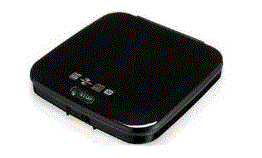
USB DVD+R Burner, External Mount
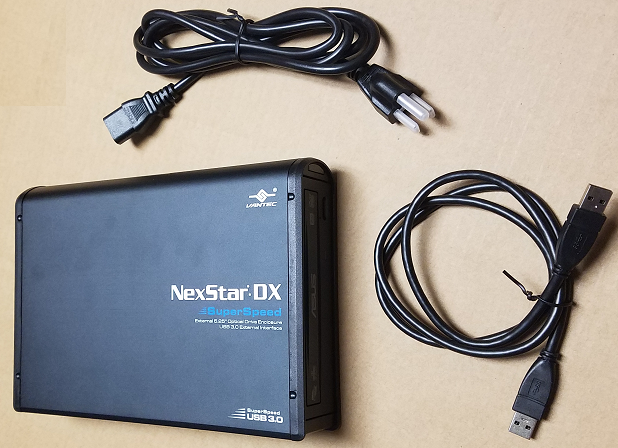
This DVD+R CD+G burner (recorder) (tested by MTU) plugs into a Laptop or other computer with a USB-1 or USB-2 port. When connected to a USB-2 port it will write a CDR disc with a sustained speed from 8x to 10x (the burner spec claims faster peak speeds). It will read a CD/CDG disc at the same speed. When connected to a USB-1 port it will write a CDR disc with a sustained speed around 4x (reading at the same speed). This burner is tested and certified by MTU to work in the supplied USB case.
Using this drive with MTU's Microstudio software can copy your karaoke CDG discs, make custom compilation discs, turn your PC into a Karaoke Player, and record you and your friends singing to the music to burn an Audio CD of the music and vocal.
Using this drive with MTU's Hoster software allows importing all of your karaoke cdg songs into the computer hard drive to play at your shows.

| |
 |
|
Write Speeds:
- DVD+R 24x
- DVD-R 24x
- DVD+R9 12x
- DVD-R9 12x
- DVD+R 24x
- DVD-Ram 12x
- CD-R 48x
|
ReWrite Speeds:
- DVD+RW 8x
- DVD-RW 6x
- CD-R 24x
|
Read Speeds:
- DVD+R 16x
- DVD-R 16x
- DVD+R9 16x
- DVD-R9 16x
- DVD+R 16x
- DVD-Ram 16x
- CD-R 48x
|
 |
|
Dimensions: 6.61(W) x 2.26(H) x 7.78(D) inches
Weight: 2.42lbs
Included Items: Power Supply, 3 FT USB Cable, Application Sofware disc, Install Guide
|
SATA DVD+R Burner, Internal Mount
This CD+G burner (recorder) mounts inside your computer in a standard 5.25" drive bay. It interfaces to the computer using a SATA (Serial ATA) cable. It writes a CDR disc at up to 48X (max, not sustained), DVD+R up to 18x, and reads up to 48x (max, not sustained).
Using this drive with MTU's Microstudio software can copy your karaoke CDG discs, make custom compilation discs, turn your PC into a Karaoke Player, and record you and your friends singing to the music to burn an Audio CD of the music and vocal.
Using this drive with MTU's Hoster software allows importing all of your karaoke cdg songs into the computer hard drive to play at your shows.
| |
 |
|
Write Speeds:
- DVD+R 24x
- DVD-R 24x
- DVD+R9 12x
- DVD-R9 12x
- DVD+R 24x
- DVD-Ram 12x
- CD-R 48x
|
ReWrite Speeds:
- DVD+RW 8x
- DVD-RW 6x
- CD-R 24x
|
Read Speeds:
- DVD+R 16x
- DVD-R 16x
- DVD+R9 16x
- DVD-R9 16x
- DVD+R 16x
- DVD-Ram 16x
- CD-R 48x
|
 |
|
Dimensions: 5.70(W) x 1.62(H) x 6.69(D) inches
Weight: 1.98lbs
Included Items: Application Sofware disc, SATA Cable, Install Guide, Mounting Screws
|
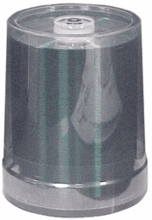
MTU CD Recordable Media is Best for Copying & Writing Karaoke CD+G Discs
MTU compact disc recordable media are engineered for CDG Karaoke singers and hosts. Karaoke Players will not play some CDR media. Over the years, MTU has heard many problems and realized that you need a CDR media that WILL work with Karaoke Players. Discs written on poor media may play in some Players, and then you take them to a new show and they won't play. MTU engineers searched and found CDR disc media that works reliably in Karaoke Players.
| Media Type: | Recordable (CDR, not CDRW) |

| Quantity/Spindle: | 100 count |
| Record Time: | 80 minutes |
| Recording Speed: | 2x to 52x Certified |
| Package: | hard shelled case, 100/spindle |
| Top Surface: | Silver; Unbranded |
| Recorded Lifetime: | 10+ years, estimated |
| Shelf-life before recording: | 5 years, estimated |
| Orange Book Standard: | Meets or exceeds |
| Target Users: | Karaoke CDG singers/hosts |
|

 |

Professional Karaoke CD+G Disc Copies
Protect your karaoke discs before they are scratched. Karaoke CD+G discs are not the same as audio or cdrom discs. Once they are scratched, there can be permanent damage. Many CDG manufacturers come and go out of business, and many more discontinue CDG discs. You need to make a backup while your discs are still good.
CD+G CAPABLE BURNERS
Do not be fooled by sales statements like "sure it can do karaoke". The majority of sales people do not know the LYRICS will not be copied!
Since 1992, we discovered which burners will work for backing up CDG discs. We have sold all of these capable burners over the years. Buying burners in lots of 10 to 100, after our certification testing we typically reject between 10% and 100% in each lot that will not write a professional copy. If you buy a burner from MTU, it will make a professional copy! If you even buy the same burner we sell elsewhere, it will fall into one of these classes:
- Professional - The copy shows the lyrics equal or better than your master. Microstudio software with an MTU burner often makes IMPROVED copies of scratched CD+G discs. NOTE: Chartbuster commercial discs have so many mastering errors that even with a Certified CDR burner and media, they will show random dots in the background and characters.
- Standard - The copy appears like the original with random dots in the background.
- Not Usable - Random dots appear in the background and the lyric letters, worse on tracks 7 and higher. Copying a copy will further increase the damage. Most CD/DVD burners that claim to "do karaoke" produce this damage.
- Total Failure - No graphics or lyrics appear. Most CD/DVD burners perform this way.
CD+G CAPABLE SOFTWARE
Audio CD software will not copy karaoke lyrics. Microstudio with an MTU CDG Certified burner will copy and play karaoke with the lyrics. MTU has written professional studio, commercial grade CD software since 1992 and Karaoke CD+G software since 1997.
CD RECORDER DISCS
CDR stands for Compact Disc Recordable, while CDRW is ReWritable.
MOST Karaoke players won't play CDRW discs! Unless you know without question that your machine will play CDRW discs, we STRONGLY recommend you not even have any CDRW discs around. If you accidentally use them, you will turn gray trying to figure out why they won't write as fast as your CDR discs, and then why they won't play in your or others Karaoke Players.
- Use QUALITY media.
- Clean all discs with a soft dry cloth to remove fingerprints, lint, etc. Wipe from the inside outward, not circular motion.
- Protect discs from cold temperatures or the lacquer layer can literally curl up and roll off the plastic disc.
- MTU CD+G CERTIFIED discs have been engineered specifically for Karaoke CD+G use.
YOUR MASTER CD+G DISCS
Scratched discs show dots in the lyrics on your karaoke player and on a copy. Make backups before it is too late. Microstudio 4.000 and higher have advanced the state-of-the-art in error correction, which can clean up many errors caused by scratches. If you don't have Microstudio 4.000 or higher, prove it yourself and run the demo to test your burner and scratched discs.
CLEAN THE BURNER LASER
If you see dots in the video, clean the laser with a cleaning disc in your burner.

CD+G Discs Instructions
Labeling Options
CDR's can be labeled in several ways, depending on how professional a look you desire and what it costs.
- Hand Written - Felt tip pens with permanent water soluble ink are the least expensive method, such as made by Dixon Ticonderoga.
- Never use a permanent marker pen that contains a solvent (you can smell them). The solvent can penetrate the disc surface and cause damage to the dye or reflective layers.
- Never use a ball point pen or any other sharp object that can scratch the surface.
- The absolute safest area where you can label your CDR is within the clear area that surrounds the center hole.
- Press-on Labels - This is a less expensive method to produce a professional-looking label. They also allow more information such as the Track numbers and song names. Follow these guidelines when using labels:
- Always use an applicator device that centers the label on the disc. If the label is not centered or has wrinkles or bubbles, the disc will spin out-of-balance, creating difficult to recognize problems with 12x and faster CDROM players.
- NEVER try to reposition a label after it is partially applied or you will damage the disc.
- Only use labels with adhesive that have been tested in spin and heat cycles, and that are not solvent based. Unapproved adhesives may have solvents that can damage the disc, or prevent it from playing properly.
Handling Warnings
- Holding the media - CDR discs should always be held with your fingers on the outside edge, or with a finger in the center hole, or by grasping it inside of the center hub.
- Storage - CDR discs should be stored in a protective case to prevent scratches rather than stacking them up.
- Protect from the Environment - Although MTU Silver CDR's can withstand direct sunlight, high humidity and UV light, it is still a good idea to avoid exposure to these conditions.
- Clean Off Fingerprints - To clean smudges on a CDR disc, use a lens tissue (from any camera shop or department). Always wipe the disc in a radial direction from the inside circle to the outside edge. Do not wipe in a circular motion around the disc. The read laser in a Karaoke Player normally will focus beyond the disc surface so that fingerprints and minor scratches do no change the data.
- Blow Off Dust - Dust should be blown off not wiped off to prevent scratching the disc surface. It also should be removed so it does not get into the drive mechanism and wind up on the reader mirror or lens and reduce the lifetime of the Karaoke Player or CDROM drive.

General Questions
- Will discs written at 12x, 16x, or 24x be readable on 1x Karaoke Players? - Yes. The recording speed is independent of the playback speed.
- Is Recording at 48x or 52x Speeds Better Than 1x? - Yes. The physics, chemistry and thermodynamics of the recording process seem to produce more consistent and readable pits within the recording dye layer at higher speeds. This may be due to an "annealing process" that occurs in pits written at 1x because the laser remains focused on the pit for a long time, causing over-heating. At higher speeds, the heating (and thus annealing process) is less.
What is a buffer underrun and why is it a problem with CDR? - When you record a CD, blocks of your music and lyrics data are interleaved between disc frames. This interleaving is done to protect the data from large surface scratches. Once the CD Burner begins to write a block, it can not stop before the interleaving is completed. If your computer cannot provide data to the cd burner fast enough, you, in effect, drain the buffer memory of the recorder. This buffer underrun condition cuts off data from the recorder and interrupts the writing process. The resulting disc will be unplayable in most CDROM players.
NOTE: MTU cdg certified CDR drives and our Microstudio software are engineered to avoid buffer underrun problems.

|
| | | |
Registered marks of Micro Technology Unlimited: Hoster, Microstudio, Vogone, Songverter
Trademarks of Micro Technology Unlimited: MTU, Karaoke Pro, KPro, KHPro, Karaoke Home Producer,
DNoise, Keyrite, MicroCD, Microeditor, Microsound
Prices and specifications subject to change without notice.
Copyright© 2000-2010 by Micro Technology Unlimited
|
|
|