
The Original and Still #1
Karaoke Software!
Songverter™ Audio/Karaoke File Converter Software
If you have a file that a program won't open because it is the wrong file format, Songverter is your answer. This file converter can do one file at a time, or convert all files from the selected format into the new format.
| Convert These File Formats | To These Karaoke File Formats | Or These Audio File Formats |
| Karaoke files with lyrics: KMA, BIN, MP3+G, WMA+G, WAV+G, ZIP* | KMA, BIN, MP3+G, WMA+G, WAV+G, ZIP* | MP3, WMA, WAV (lyrics removed) |
| Audio files: MP3, WMA, WAV | KMA, BIN, MP3+G, WMA+G, WAV+G, ZIP (black lyrics created) | MP3, WMA, WAV |
*If ZIP Max compression is found, the files are re-zipped to Std compression so most programs can use them.
| Songverter™ Software | ||
| Product | Internet Download | Add CDRom |
| Songverter™ Software | Sale 149.99 | |
| Add this to receive your order on CDROM | $40.00 | |
|
|
||
|
|
5 Ways to get Help | Read our Privacy Policy |
- Unattended Batch conversion of all files (of the selected Format in the Source Window), or convert only the files you select. If any bad files are found they are logged and conversion moves to the next file. When conversion is done, a message notifies you to view the Bad Log file.
- Recursively access sub-folders to process all matching files in all folders below the selected Source Folder.
- Keep or Delete Master Files after converting to the new format.
- Successfully Converted Files are logged in a .txt file opened by Notepad.
- Bad Files are logged in a separate .txt file opened by Notepad.
- Installs on 2 Computers that you own. It also can be moved by you to another computer at any time.

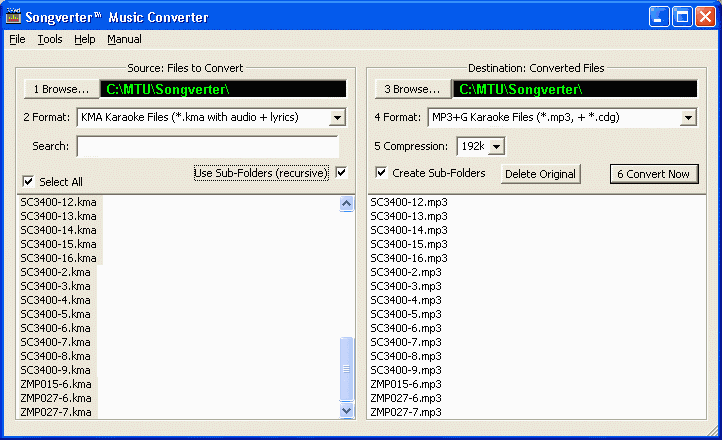

 Select Source Files To Convert
| 1 Browse... | Selects where your original files are saved on the computer hard drive. It defaults to C:/MTU/Songverter, but you can browse and select any drives and folders. |
| 2 Format | Select the file format (KMA, BIN, MP3+G, WMA+G, WAV+G, ZIP, MP3, WMA, WAV) to convert and only those files appear in the Source Window. |
| Search | As you type characters (* matches all), the Source Window changes to show only matching file names, when you want to convert only certain files. |
| Use Sub-Folders | Shows files to process located in sub-folders below the selected Source Folder, down as many sub-folder levels that are automatically found. |
| Select All | Selects to convert all files shown in the Source: Files to Convert window. Click individual files to select only those to convert, or un-select them if all are selected. Use Shift and Ctrl keys to select certain desired files. |
| Source Window | This shows all the files that will be processed. If Use Sub-Folders is checked, all files appear from every sub-folder below the selected Source Folder that match the selected Source Format. |
Select Destination For Converted Files| 3 Browse... | Select where you want to save your new files. It defaults to C:/MTU/Songverter, but you can browse and select any drives and folders. |
| 4 Format | Select the format (KMA, BIN, MP3+G, WMA+G, WAV+G, ZIP, MP3, WMA, WAV) to convert your files into. Originals are safe as a copy is made in the new format, unless you select Delete Original. |
| 5 Compression | Appears when your target format uses WMA or MP3 so you can select the compression ratio. |
| Create Sub-Folders | If Use Sub-Folders is clicked, this selects to save new created files in folders below the Destination Folder, just as they are under the Source Folder. |
| Delete Original | This button enables removing the originals after each is converted to the new format. |
| 6 Convert Now | Starts the unattended batch conversion, showing converted files in the New Converted Files window as each finishes. NOTE: If any files are found with errors that prevent converting, a beep sounds, their path/filename is written to a log file, and conversion automatically continues to the next file. |
| Destination Window | This shows the new files as they are created. If Use Sub-Folders is checked, the Source Sub-Folder names and levels are duplicated so your new files are found in the identical folder locations as the originals. |
"This is a program that makes sense!! Regardless of whether you are a DJ, a KJ or just an Audiophile, Songverter will be a great asset to have installed on your computer. The sheer ease and simplicity of using this program is amazing!! Way to go MTU and thanks for making my life easier." ...Dale, Texas, USA
"The best software available for DJ's and KJ's... miracle worker. I had a lot of cdg's going bad and due to a computer crash lost all my back ups. However, Songverter saved me from major loss. I was able to rescue them all using Songverter. Can't say enough good things about it." ... Vern, Lebanon Oregon, USA
"This program is my new best friend. Move over MP3+G ....., Songverter is in the house!!" ...Alan, Nags Head, North Carolina, USA
"WOW! I can't thank you enough for the [Max] ZIP to [Standard] ZIP conversion feature! Works really fast too." ...Bryant, Maine USA
- Windows 10, 8.1 and 7
- Installing or moving requires an Internet connection but is not required to run Songverter
- Opening MP3 files is standard; creating MP3 files requires the lame_enc.dll file be installed on your computer (instructions included while installing)